XUI 2.0 API Reference — Admin, Reseller & Player API
Complete developer reference for the XUI 2.0 IPTV panel — 227 endpoints across the Admin, Reseller, and public Player API, with authentication, live examples, and status codes
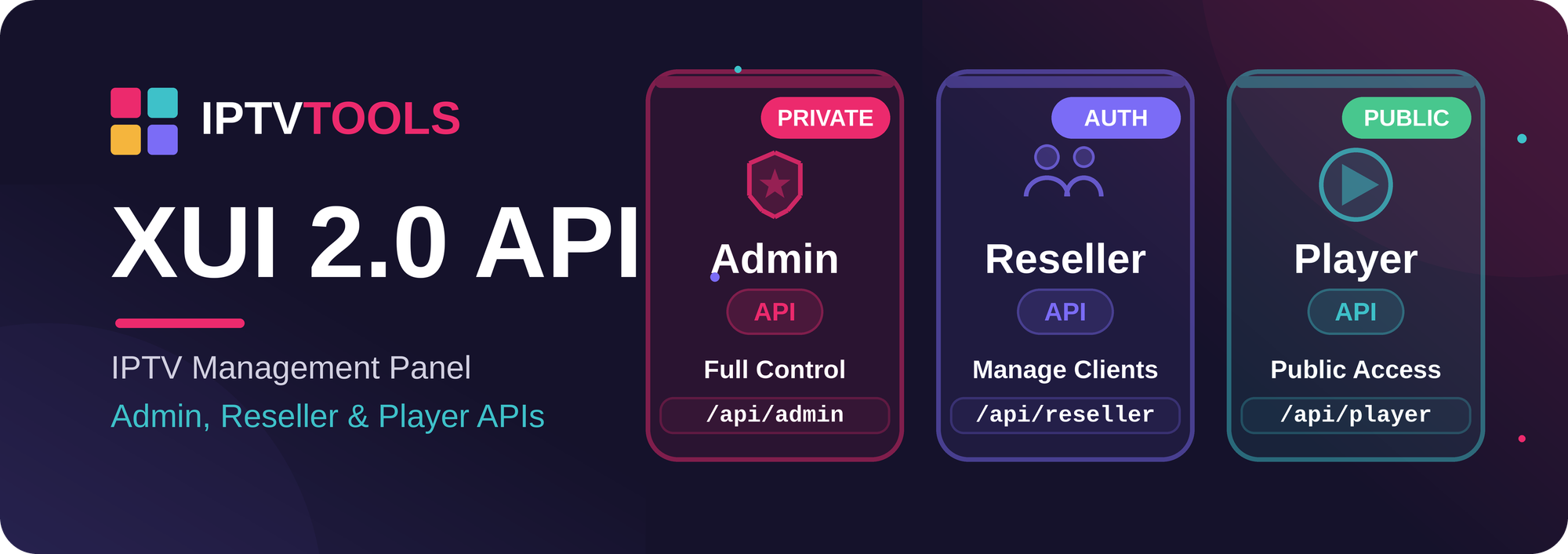
This is the complete developer reference for the XUI 2.0 IPTV management panel API. Whether you are building a billing integration, an automation script, a reseller dashboard, or a native client app, this guide documents every endpoint, how to authenticate, and how to read the responses.
The panel exposes three distinct APIs:
| API | Endpoint | Authentication | Actions | Use case |
|---|---|---|---|---|
| Admin API | /<access-code>/ → includes/api/admin |
api_key (admin user) |
181 | Full panel management |
| Reseller API | /<access-code>/ → includes/api/reseller |
api_key (reseller user) |
35 | Reseller operations (lines, MAG, Enigma, users) |
| Player API (public) | /player_api.php |
username + password (line) |
11 | Client apps (IPTV Smarters, TiviMate, etc.) |
Tested: The Admin API read-only surface is verified at 68/68 OK; all mutating endpoints were validated through safe create → verify → delete cycles; the public player_api.php is confirmed working. The Reseller API uses the same wrapper mechanism as the Admin API.Authentication
Admin & Reseller API — API key
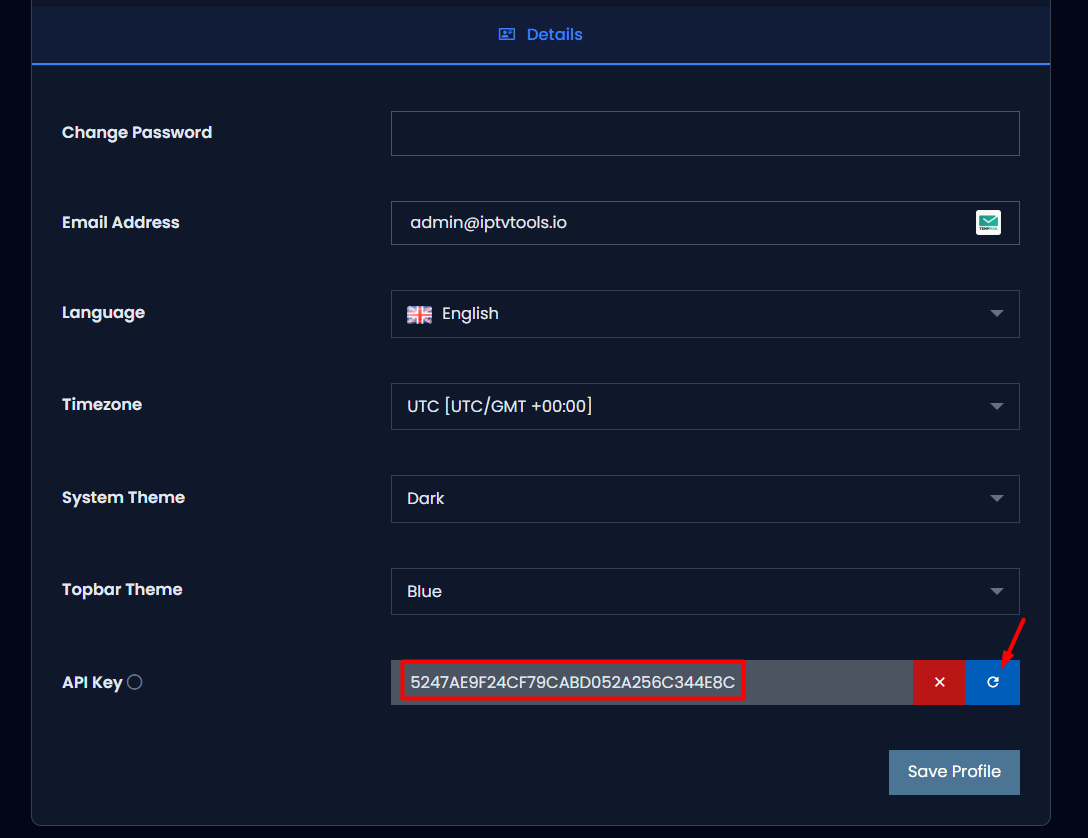
Every panel account (admin or reseller) has an api_key field (a 32-character hex string) stored on the user record. To enable API access:
- Generate the key from the panel: Account → API Key.
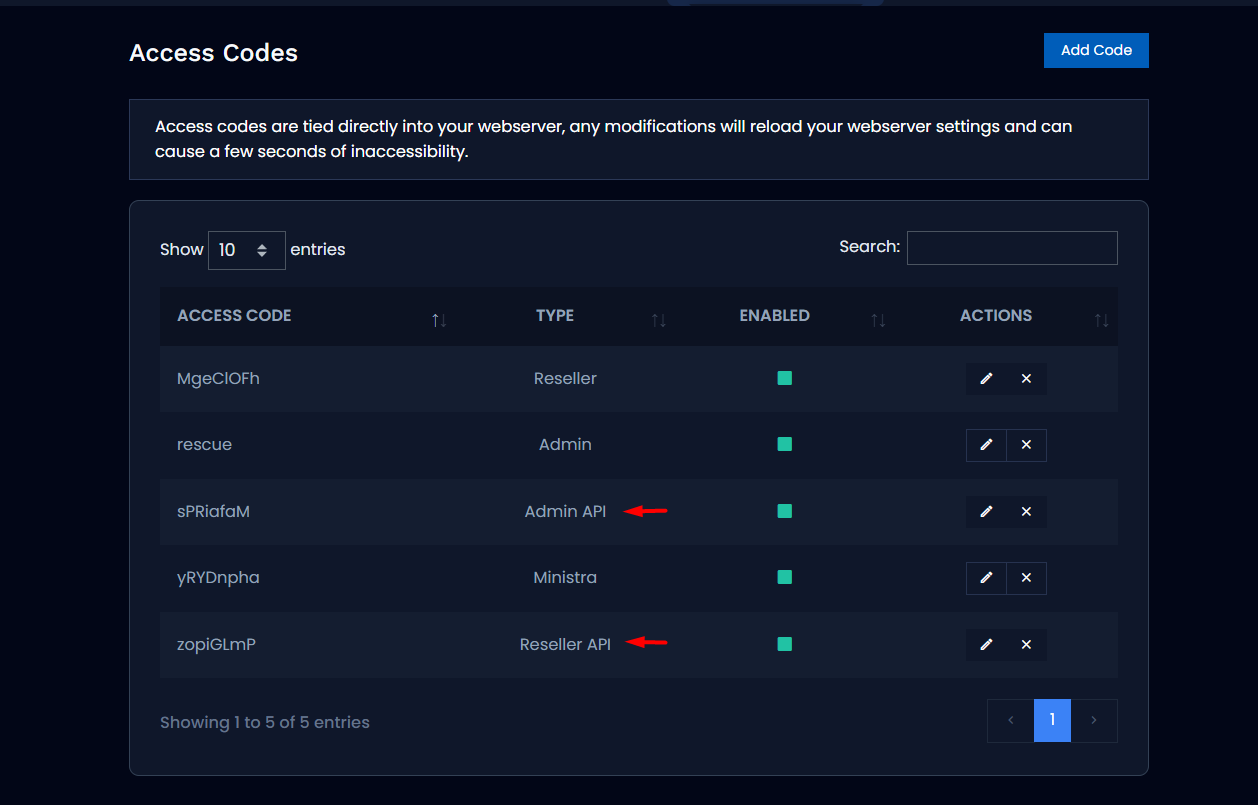
- An administrator creates an API-type access code that routes to the API handler. Nginx aliases the code path to
includes/api/admin(orincludes/api/reseller).
- Every request sends the
api_keyas a parameter.
Base URL (the access code becomes the path prefix):
https://your-panel.com/YOUR_ACCESS_CODE/?api_key=YOUR_API_KEY&action=ACTION&...
Quick sanity check:
curl "https://your-panel.com/YOUR_ACCESS_CODE/?api_key=YOUR_API_KEY&action=user_info"
{
  "status": "STATUS_SUCCESS",
  "data": { "id": "3", "username": "admin", "member_group_id": "1", "...": "..." }
}
Player API — line credentials
Client applications authenticate with the username and password of a line (subscriber):
https://your-panel.com/player_api.php?username=USER&password=PASS&action=ACTION
Conventions (Admin & Reseller API)
| Parameter | Description |
|---|---|
action |
The endpoint to call (required) |
api_key |
Authentication key (required) |
start |
Pagination offset (default 0) — list/"TableAPI" endpoints only |
limit |
Number of rows (default 50) |
show_columns |
Comma-separated list of columns to include |
hide_columns |
Comma-separated list of columns to exclude |
Response shapes. There are two:
- Envelope:
{"status":"STATUS_SUCCESS","data":{...}}for a single object, or{"status":"STATUS_SUCCESS","data":[...],"recordsTotal":N,"recordsFiltered":N}for paginated lists. - Raw array: some lookup-style getters return a bare JSON array (e.g.
get_servers,get_bouquets,get_categories,get_epgs,get_packages).
On error you get {"status":"STATUS_<REASON>","data":{...echoed input...}}. See Status codes for the full list.
HTTP method: GET and POST both work (parameters can be in the query string or the body). Use POST for large payloads such as JSON selector arrays.
Admin API reference
The Admin API follows a uniform CRUD pattern per resource: get_<plural> (list), get_<singular>&id=N (one), create_<x>, edit_<x>&id=N, delete_<x>&id=N. For create/edit, the accepted parameters are the columns of the underlying table (mapped automatically) plus the JSON selectors described in Developer notes.
Lines (subscribers)
get_lines · get_line&id= · create_line · edit_line&id= · delete_line&id= · ban_line&id= · unban_line&id= · enable_line&id= · disable_line&id= · kill_connection
# Create a line (minimal)
curl "$BASE/?api_key=$KEY&action=create_line&username=client01&password=Secret123&member_id=3"
# => {"status":"STATUS_SUCCESS","data":{"id":"42","username":"client01", ...}}

curl "$BASE/?api_key=$KEY&action=get_line&id=42"
curl "$BASE/?api_key=$KEY&action=ban_line&id=42"
curl "$BASE/?api_key=$KEY&action=delete_line&id=42"
Useful create_line / edit_line parameters: username, password, member_id (owner), package, exp_date, max_connections, is_trial, bouquets_selected (JSON), allowed_ips, allowed_ua.
MAG devices
get_mags · get_mag&id= · create_mag · edit_mag&id= · delete_mag&id= · ban_mag&id= · unban_mag&id= · enable_mag&id= · disable_mag&id= · convert_mag&id= · mag_events
curl "$BASE/?api_key=$KEY&action=create_mag&mac=00:1A:79:AA:BB:CC&member_id=3"
Enigma2 devices
get_enigmas · get_enigma&id= · create_enigma · edit_enigma&id= · delete_enigma&id= · ban_enigma&id= · unban_enigma&id= · enable_enigma&id= · disable_enigma&id= · convert_enigma&id=
Panel users (admin / reseller / sub-reseller)
get_users · get_user&id= · create_user · edit_user&id= · delete_user&id= · enable_user&id= · disable_user&id= · adjust_credits
curl "$BASE/?api_key=$KEY&action=create_user&username=reseller1&password=Secret123&member_group_id=2"
curl "$BASE/?api_key=$KEY&action=adjust_credits&id=7&credits=100"
Live streams
get_streams · get_stream&id= · create_stream · edit_stream&id= · delete_stream&id= · start_stream&id= · stop_stream&id=
curl "$BASE/?api_key=$KEY&action=create_stream&stream_display_name=My+Channel"
# Add the source via edit_stream (stream_source as JSON) or in the create payload
curl "$BASE/?api_key=$KEY&action=start_stream&id=10"   # starts the encoder
curl "$BASE/?api_key=$KEY&action=stop_stream&id=10"
Channels, Movies, Series, Episodes, Stations (radio)
The same CRUD schema, plus start_ / stop_ where applicable:
- Channels:
get_channels,get_channel&id=,create_channel,edit_channel&id=,delete_channel&id=,start_channel&id=,stop_channel&id= - Movies (VOD):
get_movies,get_movie&id=,create_movie,edit_movie&id=,delete_movie&id=,start_movie&id=,stop_movie&id= - Series:
get_series_list,get_series&id=,create_series,edit_series&id=,delete_series&id= - Episodes:
get_episodes,get_episode&id=,create_episode,edit_episode&id=,delete_episode&id=,start_episode&id=,stop_episode&id= - Stations (radio):
get_stations,get_station&id=,create_station,edit_station&id=,delete_station&id=,start_station&id=,stop_station&id=
create_channel/create_stationreturnSTATUS_NO_SOURCESif no source is supplied;create_episoderequiresseries,season_num, and a valid source.
Providers & provider streams
get_providers · get_provider&id= · create_provider · edit_provider&id= · delete_provider&id= · reload_provider&id= · get_provider_streams
curl "$BASE/?api_key=$KEY&action=create_provider&name=MyProvider&ip=1.2.3.4&port=8080&username=u&password=p"
Categories, Bouquets, Packages, Groups
- Categories:
get_categories,get_category&id=,create_category(category_name,category_type= live/movie/series/radio),edit_category&id=,delete_category&id= - Bouquets:
get_bouquets,get_bouquet&id=,create_bouquet(bouquet_name),edit_bouquet&id=,delete_bouquet&id= - Packages:
get_packages,get_package&id=,create_package(package_name+groups_selected,bouquets_selected),edit_package&id=,delete_package&id= - Groups:
get_groups,get_group&group_id=,create_group(group_name+permissions_selected,groups_selected,packages_selected),edit_group&group_id=,delete_group&id=⚠️ (delete usesid)
EPG, Transcode profiles, Access codes, HMAC, RTMP IPs, Watch folders
- EPG:
get_epgs,get_epg&id=,create_epg(epg_name,epg_file),edit_epg&id=,delete_epg&id=,reload_epg - Transcode profiles:
get_transcode_profiles,get_transcode_profile&id=,create_transcode_profile(profile_name),edit_transcode_profile&id=,delete_transcode_profile&id=⚠️ (delete usesid) - Access codes:
get_access_codes,get_access_code&id=,create_access_code(code— min. 8 chars whentype≠ 2 — plustype),edit_access_code&id=,delete_access_code&id= - HMAC:
get_hmacs,get_hmac&id=,create_hmac(requireskey),edit_hmac&id=,delete_hmac&id= - RTMP IPs:
get_rtmp_ips,get_rtmp_ip&id=,create_rtmp_ip(ip),edit_rtmp_ip&id=,delete_rtmp_ip&id=,get_rtmp_stats - Watch folders:
get_watch_folders,get_watch_folder&id=,create_watch_folder,edit_watch_folder&id=,delete_watch_folder&id=,reload_watch_folder
Servers & system
get_servers · get_server&id= · install_server · edit_server&id= · delete_server&id= · get_server_stats · get_certificate_info · get_free_space · get_fpm_status · get_pids · install_proxy · edit_proxy
curl "$BASE/?api_key=$KEY&action=get_server_stats"   # { cpu, cpu_cores, ram, ... }
curl "$BASE/?api_key=$KEY&action=get_free_space"
Blocking (IP / ISP / User-Agent)
get_blocked_ips · add_blocked_ip (ip) · delete_blocked_ip · flush_blocked_ips · get_blocked_isps · add_blocked_isp · delete_blocked_isp · get_blocked_uas · add_blocked_ua (ua) · delete_blocked_ua
Logs & monitoring
activity_logs · client_logs · credit_logs · login_logs · user_logs · system_logs · restream_logs · stream_errors · live_connections · watch_output · mag_events
All are paginated (start / limit) and use the envelope shape with recordsTotal.
Settings & utilities
get_settings/edit_settings— read and write panel settings.get_directory&path=/...— list a directory (file browser).reload_cache,reload_nginx,reload_epg,clear_streams,clear_temp— maintenance operations.kill_pid&pid=,kill_connection— force-stop a process or connection.mysql_query&query=...— run raw SQL (powerful, admin-only). Example:
curl "$BASE/?api_key=$KEY&action=mysql_query&query=SELECT+COUNT(*)+AS+n+FROM+%60lines%60"
# => {"status":"STATUS_SUCCESS","data":[{"n":"1"}],"insert_id":0}
⚠️ Destructive endpoints run immediately, with no confirmation:delete_server,install_server,install_proxy,reload_nginx,kill_pid,clear_streams,clear_temp,flush_blocked_ips, andmysql_query(non-SELECT). Use with care.
Player API (public)
Endpoint: /player_api.php. Authentication uses a line's username + password. It follows the standard IPTV player protocol, so it works out of the box with popular client apps such as IPTV Smarters and TiviMate.
| Action | Description |
|---|---|
| (no action) | Account + server info (user_info, server_info) |
get_live_categories |
Live categories |
get_live_streams |
Live channels (optional category_id filter) |
get_vod_categories |
VOD categories |
get_vod_streams |
VOD movies (optional category_id filter) |
get_vod_info&vod_id= |
Movie details |
get_series_categories |
Series categories |
get_series |
Series list |
get_series_info&series_id= |
Seasons / episodes |
get_short_epg&stream_id= |
Short EPG (upcoming programs) |
get_epg&stream_id= / get_simple_data_table |
Full EPG |
# Authentication / account info
curl "https://your-panel.com/player_api.php?username=USER&password=PASS"
{
  "user_info":   { "username": "USER", "auth": 1, "status": "Active", "exp_date": "...", "max_connections": "1" },
  "server_info": { "url": "...", "port": "80", "https_port": "443", "timezone": "..." }
}
# Live channels
curl "https://your-panel.com/player_api.php?username=USER&password=PASS&action=get_live_streams"
[
  { "num": 1, "name": "HBO", "stream_type": "live", "stream_id": 1,
    "category_id": "1", "tv_archive": 1, "tv_archive_duration": 1 }
]
Playback URLs
Derived from the responses above:
| Type | URL |
|---|---|
| Live | https://your-panel.com/live/USER/PASS/<stream_id>.m3u8 (or .ts) |
| VOD | https://your-panel.com/movie/USER/PASS/<stream_id>.<ext> |
| Series | https://your-panel.com/series/USER/PASS/<episode_id>.<ext> |
| Timeshift | https://your-panel.com/timeshift/USER/PASS/<dur>/<YYYY-MM-DD:HH-MM>/<stream_id>.m3u8 |
| M3U playlist | https://your-panel.com/get.php?username=USER&password=PASS&type=m3u_plus&output=ts |
| XMLTV EPG | https://your-panel.com/xmltv.php?username=USER&password=PASS |
Reseller API
The Reseller API lives at includes/api/reseller and uses the same mechanism as the Admin API (api_key + action), but it is scoped to reseller operations and to the reseller's own clients. It requires a dedicated access code that aliases to includes/api/reseller (an administrator creates it under Access Codes).
Actions (35): user_info, packages, get_lines / get_line / create_line / edit_line / delete_line / enable_line / disable_line, get_mags / get_mag / create_mag / edit_mag / delete_mag / enable_mag / disable_mag, get_enigmas / get_enigma / create_enigma / edit_enigma / delete_enigma / enable_enigma / disable_enigma, get_users / get_user / create_user / edit_user / delete_user / enable_user / disable_user, convert_mag, convert_enigma, adjust_credits, activity_logs, user_logs, live_connections.
Status codes
The API returns a string status name. The full set:
| Code | Meaning | Code | Meaning |
|---|---|---|---|
STATUS_SUCCESS (1) |
OK | STATUS_EXISTS_USERNAME (22) |
Username already exists |
STATUS_SUCCESS_MULTI (2) |
OK (multiple) | STATUS_EXISTS_MAC (23) |
MAC already exists |
STATUS_CODE_LENGTH (3) |
Code too short (< 8) | STATUS_EXISTS_SOURCE (24) |
Source already exists |
STATUS_NO_SOURCES (4) |
Missing source | STATUS_EXISTS_IP (25) |
IP already exists |
STATUS_DISABLED (5) |
Disabled | STATUS_EXISTS_DIR (26) |
Directory already exists |
STATUS_NOT_ADMIN (6) |
Not an admin | STATUS_SUCCESS_REPLACE (27) |
OK (replaced) |
STATUS_INVALID_EMAIL (7) |
Invalid email | STATUS_FLUSH (28) |
Flushed |
STATUS_INVALID_PASSWORD (8) |
Invalid password | STATUS_TOO_MANY_RESULTS (29) |
Too many results |
STATUS_INVALID_IP (9) |
Invalid IP | STATUS_SPACE_ISSUE (30) |
Insufficient disk space |
STATUS_INVALID_PLAYLIST (10) |
Invalid playlist | STATUS_INVALID_USER (31) |
Invalid user |
STATUS_INVALID_NAME (11) |
Invalid name | STATUS_CERTBOT (32) / _INVALID (33) |
Certbot |
STATUS_INVALID_CAPTCHA (12) |
Invalid captcha | STATUS_INVALID_INPUT (34) |
Invalid input |
STATUS_INVALID_CODE (13) |
Invalid code | STATUS_NOT_RESELLER (35) |
Not a reseller |
STATUS_INVALID_DATE (14) |
Invalid date | STATUS_NO_TRIALS (36) |
No trials left |
STATUS_INVALID_FILE (15) |
Invalid file | STATUS_INSUFFICIENT_CREDITS (37) |
Insufficient credits |
STATUS_INVALID_GROUP (16) |
Invalid group | STATUS_INVALID_PACKAGE (38) |
Invalid package |
STATUS_INVALID_DATA (17) |
Invalid data | STATUS_INVALID_TYPE (39) |
Invalid type |
STATUS_INVALID_DIR (18) |
Invalid directory | STATUS_INVALID_USERNAME (40) |
Invalid username |
STATUS_INVALID_MAC (19) |
Invalid MAC | STATUS_INVALID_SUBRESELLER (41) |
Invalid sub-reseller |
STATUS_EXISTS_CODE (20) |
Code already exists | STATUS_NO_DESCRIPTION (42) / STATUS_NO_KEY (43) |
Missing description / key |
STATUS_EXISTS_NAME (21) |
Name already exists | STATUS_EXISTS_HMAC (44) … STATUS_NO_SOURCE (48) |
Other errors |
STATUS_FAILURE is the generic failure (e.g. a non-existent id on get/delete).
Developer notes (gotchas)
delete_groupanddelete_transcode_profiletakeid(notgroup_id/profile_id), even thoughcreate/get/editusegroup_id/profile_id. Send the value asid=when deleting.- JSON selectors (
bouquets_selected,groups_selected,packages_selected,permissions_selected,devices_selected,users_selected) are JSON array strings, e.g.bouquets_selected=[1,2,3]. On edit, omitting a selector resets that field to empty — always send the full desired state, exactly as the panel form does. create_access_code:codemust be at least 8 characters whentype≠ 2; passgroups[]for types 0/1/3/4.create_hmacrequireskey;create_channel/create_stationrequire a source (otherwiseSTATUS_NO_SOURCES).- Pagination: only "TableAPI" endpoints (
get_lines,get_streams,get_users, logs, …) honorstart/limitand returnrecordsTotal. Lookup getters return the full raw array. - Column filtering: use
show_columns/hide_columnsto trim the payload.
Robustness note. Previously,create_group/create_package/create_line/create_mag/create_enigma/create_access_codecould return an empty body when the JSON selectors were omitted. The API dispatch layer now defaults those selectors so the endpoints always return a clean status (success or a validation error) instead of a blank response.
Quick start checklist
- Generate your
api_keyin Account → API Key. - Ask your administrator for the API access code (the path prefix).
- Set two shell variables and you're ready:
BASE="https://your-panel.com/YOUR_ACCESS_CODE"
KEY="YOUR_API_KEY"

curl "$BASE/?api_key=$KEY&action=user_info"
curl "$BASE/?api_key=$KEY&action=get_lines&limit=10"
That's it — you now have programmatic access to the entire XUI 2.0 panel. Happy building.
 IPTVTools